

 GPT Image 2.6 团队
The short answer: GPT Image 2.6 makes a GIF in one call, but only on the generations endpoint: set output_format: "gif" and pick gpt-image-2.6-flare or gpt-image-2.6-sunburst. The loop is controlled by two fields, frame_count (default 9) and frame_duration_ms (default 200), so a default GIF lasts 1.8 seconds. OpenAI's edit endpoint cannot return a GIF, so through the API a photo must be described again in a generation prompt. You can skip the API too: the generator on this site makes the loop from a prompt or an uploaded image, for 40 credits on Flare or 52 on Sunburst.
On OpenAI's API, a GIF is a generations feature
On OpenAI's API, a GIF request only works against POST /v1/images/generations. OpenAI's image generation guide says it plainly: GIF output is for image generation, and the edit endpoint does not support it. The format lists agree: generations take png, jpeg and webp, plus svg and gif, and edits take the first three only.
So OpenAI's edit endpoint offers no path from an uploaded picture to a loop. Through the API you describe the scene again in a prompt, and the model animates it from scratch. To start from your own picture without code, upload it to the generator on this site and choose Animated GIF.
Four settings and one prompt
Four settings cover the whole request, and the prompt does the creative work.
- Pick the variant.
gpt-image-2.6-flareis the smaller model, built for fast iteration.gpt-image-2.6-sunburstis the base model for detail and precise edits. There is no baregpt-image-2.6ID, so one of the two suffixes is always required. - Describe motion, not just a scene. Name what moves, how far, and where it ends. OpenAI's guide suggests giving the subject a pose to return to and saying whether the camera moves.
- Ask for the loop in words. A clip that ends on its first frame plays without a visible jump. So say "make the motion loop smoothly" and hold the camera still if you do not want a pan.
- Set the frame fields and the frame size.
sizedescribes one finished frame, not the whole set, and both sides must be multiples of 16.512x512meets both rules: it is square, and both sides are multiples of 16.
from openai import OpenAI
import base64

client = OpenAI()
result = client.images.generate(
    model="gpt-image-2.6-sunburst",
    prompt=(
        "A paper windmill on a green hill under a blue sky. "
        "The blades turn through one full circle and stop where they started. "
        "Keep the camera still and make the motion loop smoothly."
    ),
    output_format="gif",
    frame_count=9,
    frame_duration_ms=200,
    size="512x512",
)
with open("windmill.gif", "wb") as f:
    f.write(base64.b64decode(result.data[0].b64_json))
One request returns one file. Decode data[0].b64_json and save the bytes with a .gif extension. The rest of the parameters sit on the GPT Image 2.6 page.
Frame count and frame timing pull against each other
Frame count buys smoothness, frame duration buys speed, and the two multiply into loop length. frame_count takes 2 to 64 frames. frame_duration_ms takes 20 to 2000 ms per frame, rounded to 10 ms.
| Frames | Per frame | Loop length | What you get |
|---|---|---|---|
| 6 | 300 ms | 1.8 s | Fewest frames, visible steps |
| 9 | 200 ms | 1.8 s | The default balance |
| 18 | 100 ms | 1.8 s | Smoother, twice the frames |
| 24 | 80 ms | 1.92 s | Smoothest, heaviest request |
Several settings reach the same loop length, and they do not look alike. Nine frames at 200 ms is the default and reads as one small movement. Six frames at 300 ms covers the same 1.8 seconds with fewer drawings.
More frames mean more pixels, because every frame is drawn. The request has to fit a total pixel budget, and the documented fix is to lower frame_count, the frame size or n.
Keep the motion small. Steam, a flag, a blink or a turning blade fits nine frames. A full scene change inside nine frames reads as a slideshow.
What a GIF costs
GIFs and stills use the same token rates, but one GIF contains many frames. OpenAI charges $8 per 1M image input tokens, $30 per 1M image output tokens and $5 per 1M text input tokens.
Flare and Sunburst share those rates, and both match GPT Image 2.5. GPT Image 2.5 also has a Batch rate of $15 per 1M image output tokens. GPT Image 2.6 does not appear in that Batch table, and its model page lists no Batch price.
Equal unit prices still do not mean equal cost per picture. The two models can spend different token counts on the same prompt, so check a few real requests before you budget.
On this site a GIF has its own flat price, separate from the still tiers.
| Job | Flare | Sunburst |
|---|---|---|
| Still, 1K | 20 | 26 |
| Still, 2K | 30 | 39 |
| Still, 4K | 60 | 78 |
| GIF | 40 | 52 |
Low and medium quality cost the same for stills, and high adds 50%. Credits and packs are on the pricing page.
Why this site's GIF frames are small
Each frame gets a 512×512 pixel budget, scaled to the aspect ratio you pick, and the loop runs the default 9 frames. Every frame in a GIF shares one request-wide pixel budget, and nine 1024×1024 frames would sit well outside it. This page sends no frame fields, so the defaults hold and every GIF it returns runs 1.8 seconds.
The rest is a normal generation. You write a prompt, add a reference image if you want one, choose Flare or Sunburst, and get a finished GIF back. There is no OpenAI account or API key in the loop, and a failed run refunds its credits.
Stills are a separate mode, at 1K, 2K or 4K. Both modes take up to 16 reference images. If you are weighing the two variants, the 2.6 vs 2.5 comparison covers the rest of the settings.
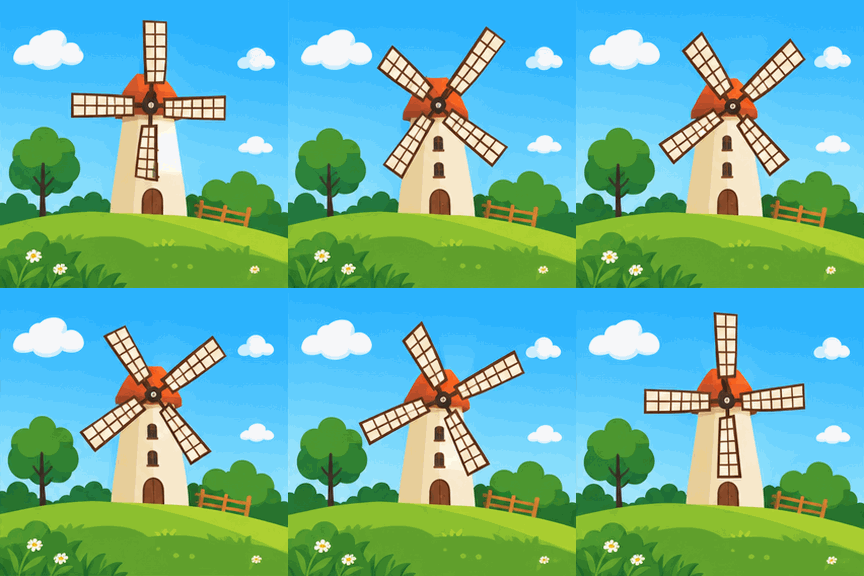
A 288×288 looping GIF: a windmill on green hills under a blue sky.
FAQ
Can GPT Image 2.6 make a GIF from a photo I upload?
Yes, on this site: upload the photo, choose Animated GIF and describe the motion in the prompt. OpenAI's own edit endpoint returns still images only, so through its API you describe the subject and the motion in a generations request instead.
How many frames can a GPT Image 2.6 GIF have?
Between 2 and 64, with 9 as the default. A higher count smooths the motion and uses more of the request's pixel budget, so very long loops need smaller frames.
How long can the loop be?
frame_duration_ms allows 20 to 2000 ms per frame, so on paper a 64-frame loop can run far longer than a social clip needs. The default 9 frames at 200 ms gives 1.8 seconds, which suits one small repeated motion.
Why did my GIF request fail on size?
The request went over the pixel budget. Lower frame_count, the frame size or n until it fits. OpenAI's guide lists those three as the levers, and size="auto" lets the API choose a frame size within its limits.
What does a GIF cost on this site?
40 credits with Flare and 52 with Sunburst, and a failed run refunds its credits. You need no OpenAI account or API key, and stills start at 20 credits.
Sources
- OpenAI changelog, November 4, 2026
- OpenAI image generation guide
- OpenAI image prompting guide
- OpenAI API pricing
- GPT-Image-2.6 Flare model page
- GPT-Image-2.6 Sunburst model page
- gptimage26.app pricing
Revision log
- November 5, 2026 — Page published.
- November 5, 2026 — Updated: the generator on this site now makes GIFs from uploaded images.