

 GPT Image 2.6 团队
The short answer: a GPT Image 2.6 edit keeps what you name in the prompt and mark in an overlay, but not a copy of your file, because the model redraws the picture. The wall, the floor line and the light need a prompt and a check. Markup works on 2.5 too, so it is not a reason to upgrade. The test that tells you the most is simple: add one object to a real photo, then compare the rest of the frame with the original.
Nothing survives by default in a 2.6 edit
An edit redraws the scene, so nothing is kept for free. OpenAI's own markup walkthrough ends with a check: compare the rest of each image with the original to catch other changes.
The 2.6 parameter list is short: quality, complexity, size, background, output_format and markup. None of them restores the input pixel for pixel, so preservation rides on the prompt, the first image and the overlay.
Markup: a transparent PNG that points at one spot
Markup is the simplest way to say where a change goes and leave the rest alone. You draw a circle, an arrow or a rough outline, and the model reads it as a location while your prompt describes the change.
The rules are strict and easy to get wrong. The overlay needs the same pixel dimensions as the first input image. It must be a transparent PNG, not flattened onto the photo. Send it as markup with the edit request.
The overlay pairs with your first input image. Any other images act as references, and the prompt still has to say what changes.
Then ask for the circle to be removed in the prompt.
Markup is not a 2.6 upgrade reason
Markup cannot justify a model swap, because it already runs on 2.5. The 2.6 changelog says the feature was added "for supported GPT Image 2.5 and 2.6 models". If your 2.5 workflow has no overlay step, that is a setup gap, not a model gap.
Test it on the model you already pay for. If the frame holds there, you have your answer without a migration. The 2.6 vs 2.5 breakdown covers the rest of the settings that did change.
OpenAI's edit endpoint takes raster output only
On OpenAI's API, edits come back as PNG, JPEG or WebP, and never as SVG or GIF. Both of those belong to the generations endpoint.
| Output format | Generations endpoint | Edit endpoint |
|---|---|---|
| PNG | Yes | Yes |
| JPEG | Yes | Yes |
| WebP | Yes | Yes |
| SVG | Yes | No |
| GIF | Yes | No |
This matters when you plan around one edited frame. On OpenAI's API, a loop of that photo is a separate generations call, not an edit of your file. On this site, you can upload the photo and choose Animated GIF. For GIF, the API takes frame_count from 2 to 64 frames and frame_duration_ms, and defaults to 9 frames at 200 ms.
Flare or Sunburst when the frame must hold
Sunburst is the base model, and OpenAI points at it for detail and precise edits. Both variants generate, edit and return transparent backgrounds. Flare is the smaller of the two.
Token rates are identical, but the models can use different token counts for the same quality and size. Equal rates do not mean an equal cost per image. Price a real request before you commit. The API reference lists both model IDs and the token rates in one place.
The test worth running: add one object
Adding one object to an existing photo is the fastest way to see what an edit keeps. It forces the model to hold your frame while it makes room for something new.
Pick a photo with visible structure: a wall corner, a floor line, a window's light. Ask for one addition and name what must not move. Send the overlay if you care where the object lands.
Then put the two images side by side at the same display size. Look at the edges, the horizon, the light and the position of every big object. If any of those shifted, the edit failed your test, whatever the new object looks like.
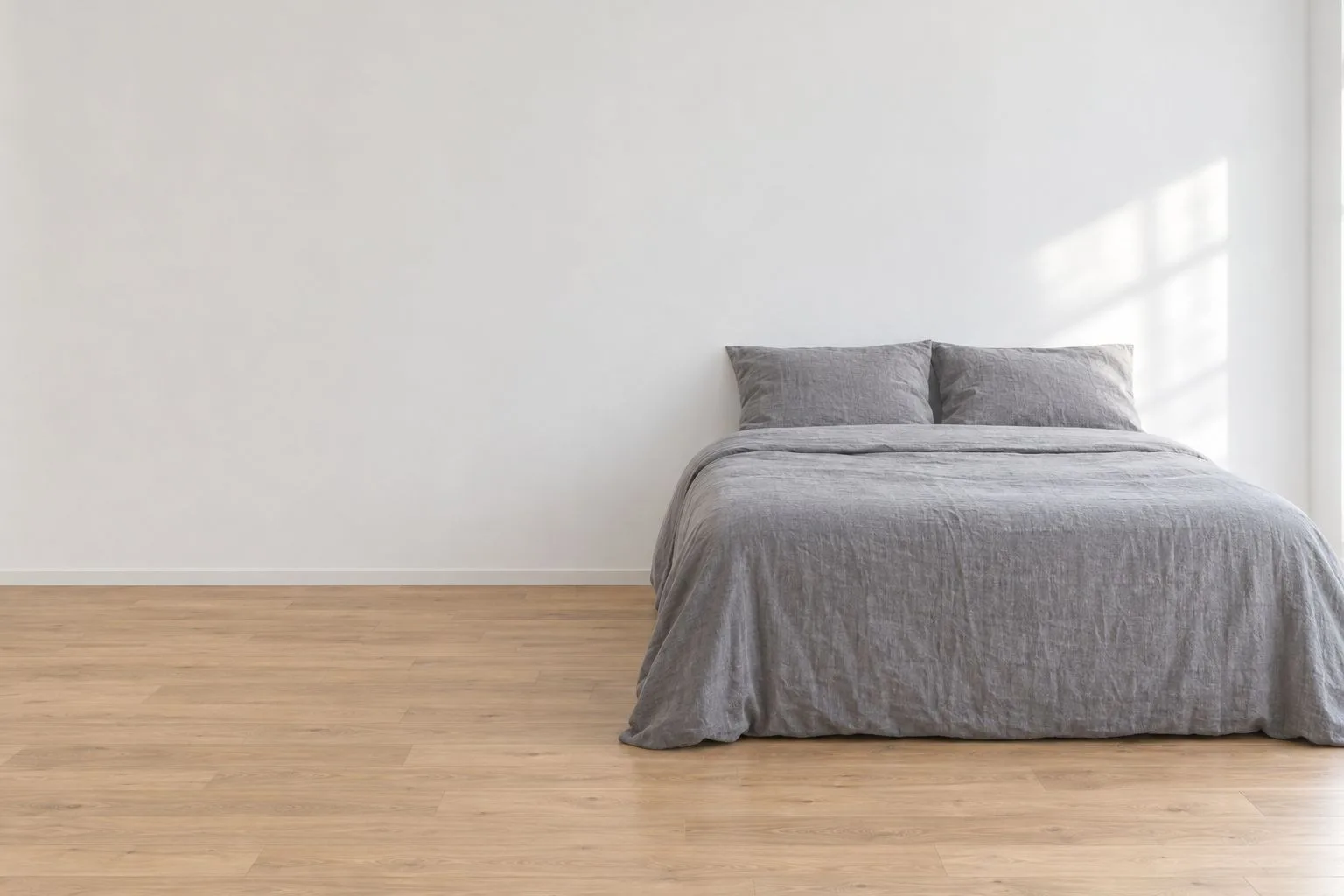
The input: one photo of a plain bedroom, with the bed, the wall and the floor as the only structure.
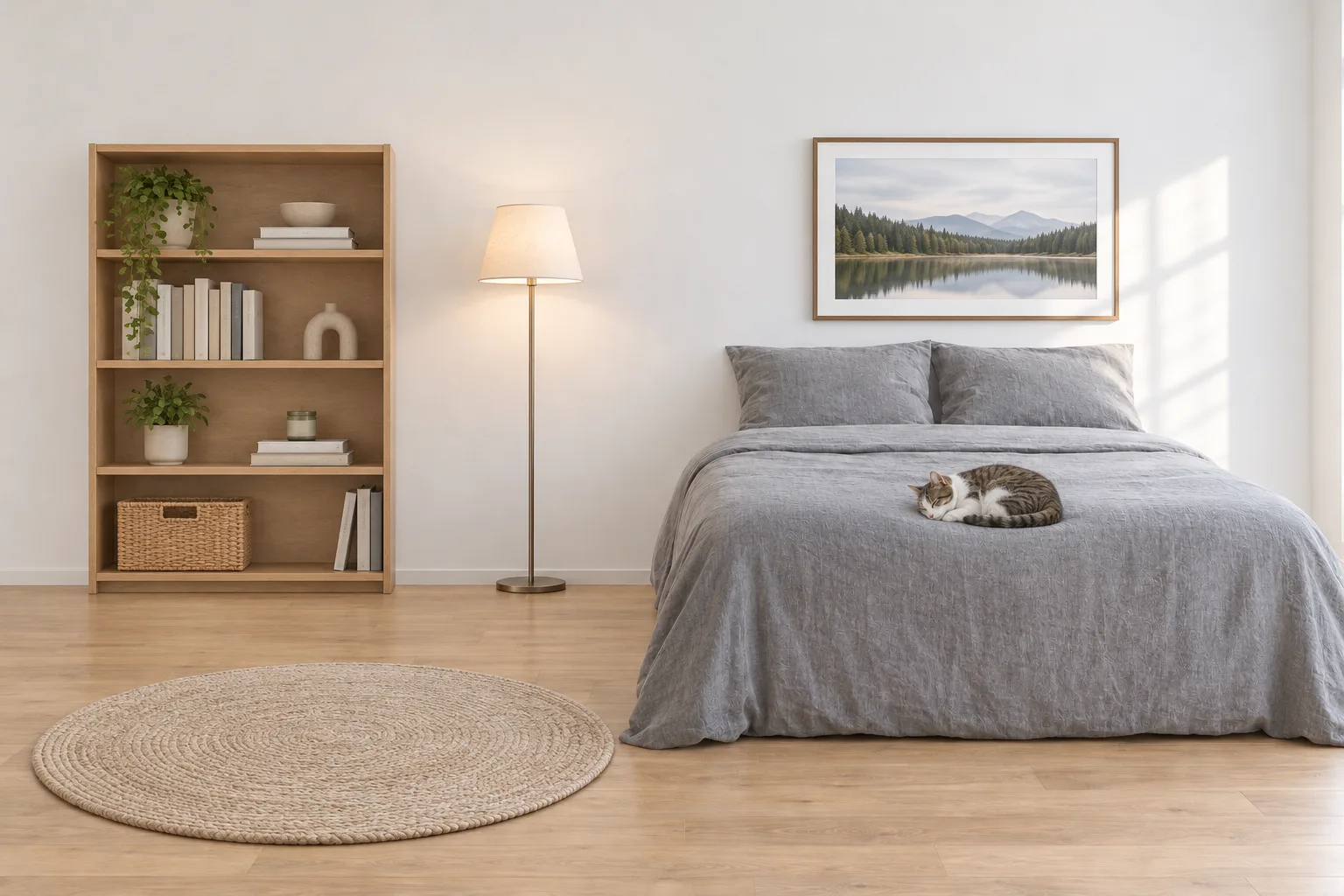
The same room after an edit: a bookshelf, a floor lamp, a round rug, a framed print and a cat asleep on the bed.
In this pair, the bed, the wall and the patch of window light stay where they were, and the additions sit around them. That is the pass condition for your own photo.
Prompt lines that hold the frame
The prompt does the holding, and markup only points at a place.
Plain, explicit constraints work best. Ask to keep an object's shape and to leave the rest of the scene unchanged. Say not to change the background, camera angle, framing or image quality, and not to add accessories, text, logos or watermarks.
Name the change, name the things that must not move, and name what you do not want added.
Keep complexity at its default unless you have a reason. It sets how much planning the model does before it renders, and both variants use high when you leave the field out. Change one setting at a time, then re-check the frame.
Run the same test on this site
You can run the frame test here without an OpenAI account or an API key. Upload a photo, describe the addition, and check the result against your original. Failed generations refund their credits automatically.
| Output size | Flare | Sunburst |
|---|---|---|
| 1K | 20 credits | 26 credits |
| 2K | 30 credits | 39 credits |
| 4K | 60 credits | 78 credits |
Quality is low, medium or high, and high adds 50%. Low and medium cost the same. A dynamic GIF costs 40 credits on Flare and 52 on Sunburst; credit packs are on the pricing page. Start with the size that still shows your frame, then open the generator.
FAQ
Does a GPT Image 2.6 edit keep the rest of the photo unchanged?
Not by default. The model redraws the frame, so anything you do not name can drift. Compare the output with the original before you use it.
What size should the markup overlay be?
Exactly the same pixel dimensions as your first input image. The overlay also has to be a transparent PNG, and it cannot be flattened onto the photo.
Can I use markup with GPT Image 2.5?
Yes. OpenAI's changelog lists markup-guided editing for supported 2.5 and 2.6 models, so the overlay is not a 2.6 feature.
Can I get an edited photo as an SVG or a GIF?
A GIF, yes, on this site: upload the photo and choose Animated GIF. Through OpenAI's API, no: both formats belong to the generations endpoint, and an edit returns PNG, JPEG or WebP. This site does not output SVG.
Which 2.6 model should I use for a precise edit?
Start with Sunburst, the base model OpenAI recommends for detail and precise edits. Try the same prompt on Flare to see whether the smaller model is enough.
Do markup edits cost extra?
No separate price is listed. Markup is a parameter on the edit request, and edits are billed at the standard image token rates: $8 per 1M input tokens and $30 per 1M output tokens.
Sources
- OpenAI changelog, November 4, 2026
- Image prompting guide, GPT Image 2.6
- Image generation guide
- API pricing
- GPT Image 2.6 Flare model page
- GPT Image 2.6 Sunburst model page
Revision log
- November 5, 2026 — Page published.
- November 5, 2026 — Updated: the generator on this site now makes GIFs from uploaded images.